This guide by The Exam Questions has the latest exam details, syllabus, official learning resources, study plan and key certification requirements for 2026.

Official C_LCNC Exam Details
|
Items |
Details |
|
Exam Name |
SAP Certified - SAP Build Developer |
|
Exam Code |
C_LCNC_2601 |
|
Format |
1 activity, System Based Assessment |
|
Cut Score |
83% |
|
Duration |
3 hours |
|
Available Language |
English |
|
Learning Journey Size |
4 courses, 1 practical exercise |
|
Learning Journey Level |
Intermediate |
|
Learning Journey Access |
Free |
|
Prerequisites |
Exploring SAP Business Technology Platform, Develop and automate with SAP Build, Experiencing End-To-End SAP Build |
- Source to verify this information: SAP Certified - SAP Build Developer.
What Is the C_LCNC_2601 Certification?
The SAP Certified - SAP Build Developer certification validates a candidate’s ability to develop with SAP Build, including connecting to SAP systems, modeling business data, and building and automating business processes using SAP Build capabilities. This is targeted at professionals in the Developer role.
What Changed in the SAP Build Developer Exam?
The certification is part of SAP’s wider initiative to evaluate practical, job-ready skills, as opposed to traditional knowledge testing. SAP says its current certification path is geared toward how candidates use their skills on real-world business issues.
The certification also has been updated from the previous SAP Certified Associate - Low-Code/No-Code Developer - SAP Build to SAP Certified - SAP Build Developer. The updated certification reflects the extended scope of SAP Build development and the skills that developers are expected to have when working with SAP Build capabilities.
Prepare for the exam with C_LCNC_2601 Learning Resources.
C_LCNC_2601 Exam Format
- It is a system based practical examination where candidates have to perform defined tasks in SAP Systems.
- The time limit may vary by assessment, so the exact time it will take to assess is shown on the certification exam page before you start your assessment.
- The assessment is based on the successful completion of the defined tasks and the resulting system outputs. The assessment is done by using automated evaluation or evaluation scripts.
- The timer begins when the assessment begins and cannot be stopped. The assessment is to be carried out in one go.
- Candidates have access to the setup guide and certification tasks via the assessment interface prior to working on the provided system environment.
Use C_LCNC_2601 Free Questions to test your knowledge and pinpoint where you need more study.
C_LCNC Syllabus and Topic Areas
|
Topic Areas |
Key Focus |
Difficulty |
|
SAP BTP Foundations |
SAP BTP concepts and development environment |
Easy |
|
SAP Build Applications |
Building SAP data consuming applications |
Medium |
|
Process Automation |
Building and configuring business process automations |
Hard |
|
API Integration |
API-based connections between apps and services |
Medium |
|
Business Data Modeling |
Business data modeling and processing |
Medium |
|
SAP Build Work Zone |
Setting up end-user access and experience |
Medium |
|
Process Visibility |
Tracking processes and defining custom KPIs |
Hard |
|
Joule Studio and AI Agents |
Joule Studio, classic edition and working with AI agent capabilities |
Hard |
C_LCNC_2601 Learning Journey
1. BTP100 - Exploring SAP Business Technology Platform
Duration: 4hr 49min Units: 6
After completing this course, you will have acquired foundational knowledge of SAP Business Technology Platform, gained insights into options for integrating and extending applications using intelligent technologies, incorporating analytics, database administration, and data management, and gained an understanding of security aspects and sustainability management.
2. Practical Exercise - Hands-on Practice System for SAP Build
Apps and SAP Build Process Automation. Build It is useful for exercises on app creation, logic for automation, backend integration and helps you to get familiar with the SAP Build Lobby and available tools.
3. SPA400 - Developing with SAP Build Process Automation
Duration: 6hr 53min Units: 6
After completing this course, you will be able to: Leverage advanced process-building capabilities in SAP Build Process Automation, identify automation use cases, build automations from scratch, integrate SAP Build Process Automation with other applications using APIs, utilize existing SAP Build Process Automation content, configure end-user access using SAP Build Work Zone and SAP Task Center Develop process visibility scenarios using custom process performance indicators.
4. WZ400 - Designing SAP Build Work Zone for Superior Efficiency
Duration: 1hr 25min Units: 1
In this course, you will learn how to: Understand the core capabilities of SAP Build Work Zone to improve user productivity and simplify business processes, configure and manage the site menu for best navigation, create and manage work pages and workspaces, integrate apps using two key methods, tune header bar user settings to improve the overall user experience.
5. AIJ100 - Getting Started with Joule Studio, classic edition
Duration: 1hr 4min Units: 4
In this course you will learn to describe Joule Studio, classic edition, its place in SAP Business Technology Platform, and how to use Joule Studio for intent-based development and agents.
Who Should Take the SAP Build Developer Exam?
- Application development skills for developers working with SAP Build and related.
- SAP Integration Suite professionals who work with application integration and APIs within the framework of SAP development and automation scenarios.
- SAP Build Code professionals who create and extend applications with SAP Build Code and its development capabilities.
The prerequisites and products and roles for this certification are mentioned at Developing with SAP Build – From Apps to Automation.
SAP Certified - SAP Build Developer Career Benefits
- Validates practical skills in building apps, automating processes and creating digital workspaces with SAP Build.
- Gives employers and professional networks a SAP credential that proves your SAP Build development skills.
- Developer role enabled by validating skills related to application development, integration and extension development.
- Warning: This certification is not a promise of employment, promotion, salary increase or any particular career result.
How to Register and Schedule the C_LCNC Exam
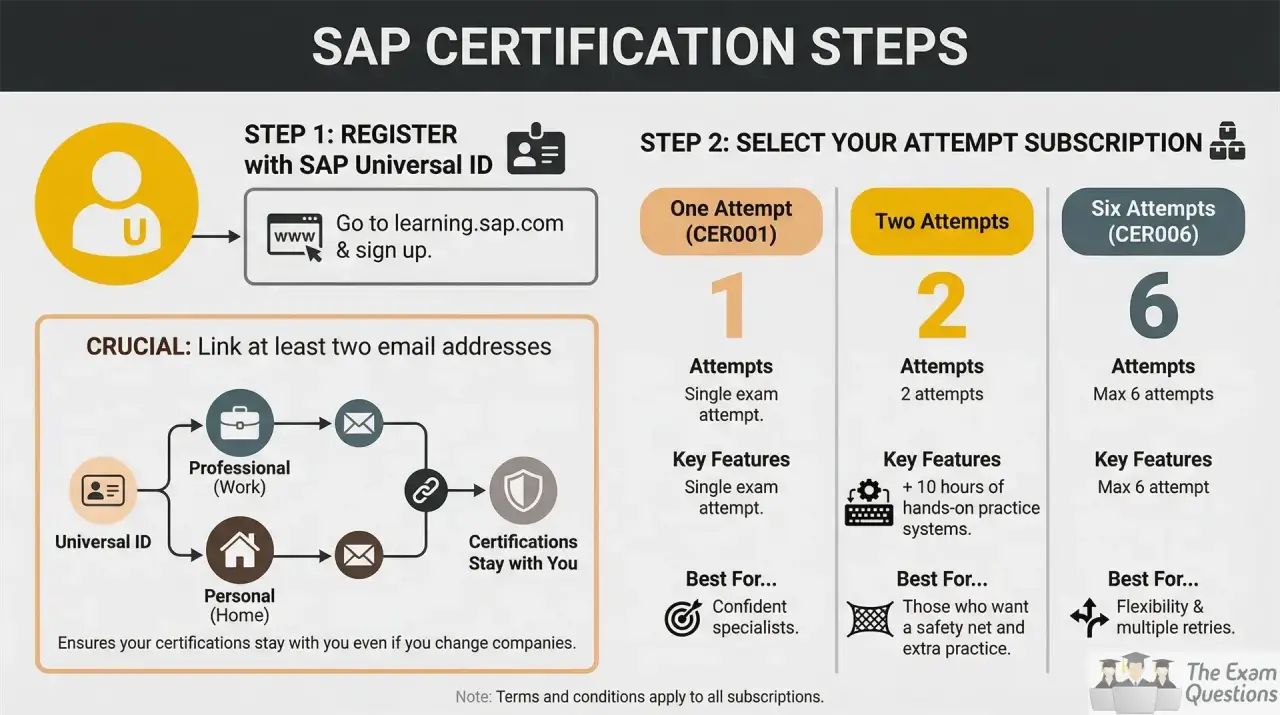
- Create your SAP Universal ID and link the required email accounts to it.
- Buy a SAP Learning Hub subscription or certification exam attempts through the available SAP options.
- Go to the certification details page of C_LCNC_2601 and check the certifications you can get.
- On the Certification page, click Go to Certification Exam to get to the exam and follow the options from there.
- Before you begin the assessment, check the assessment page for exam time available and remaining attempts.
- Before taking the exam, run SAP’s technical readiness check to ensure your device and connection meet the requirements.
C_LCNC_2601 6-Week Study Plan
Week 1:
Complete the SAP Business Technology Platform fundamentals course to build a foundation in integration, extension, analytics, data management, security, and sustainability.
Week 2:
Discover SAP Application Development with SAP Build development capabilities like leveraging SAP data and application development.
Week 3:
Build complex processes in SAP Build Process Automation e.g. use of existing automation content, create automation.
Week 4:
API-based Integration, SAP Build Work Zone, SAP Task Center, end-user Access Configuration.
Week 5:
Study of Process visibility & custom process performance indicators, Joule Studio, classic edition, intent-based development & agents
Week 6:
Consolidate learning path content and complete the available hands-on practice activities to reinforce the skills covered across SAP Build development and automation.
Use C_LCNC_2601 PDF Questions to boost your preparation for the exam.
SAP Build Developer Retake Rules
- You may take the same certification exam up to four times in any 12-month period.
- There is a 24 hour wait period between exam attempts.
- If you fail an assessment and there is still time left on the exam clock, you can immediately retry the assessment and the retry counts as one exam attempt.
- If you do not pass after 4 attempts, you must wait 12 months from the date of your last attempt before taking the certification exam again.
- If a technical problem has been verified as a system issue, and it impacted the system-based assessment, SAP may offer a new attempt upon review.
Troubleshoot all your questions about the assessment with C_LCNC_2601 FAQ.
Keeping SAP Certified - SAP Build Developer Certification Valid
- The C_LCNC_2601 certification is valid for 12 months and requires annual maintenance to stay current.
- To access the Stay Certified assessment and its preparation materials, you must be a subscriber to the SAP Learning Hub.
- You can take the Stay Certified assessment up to and including the date your certification expires, within the 90 days before your certification expires.
- On successful completion of the assessment within this time period your certification will be extended for 12 months from the date of expiry.
- Without SAP Learning Hub you will need to re-take the full certification exam every year to keep your certification.
- If your certification expires, you must pass the current certification exam to be certified again.
Conclusion
The C_LCNC_2601 certification is valid for developers who develop solutions using SAP Build and related SAP technologies. A targeted approach to preparation can help candidates understand the development capabilities required and work through the official learning content prior to attempting the certification. SAP recommends all the candidates to complete the learning journey.
Check where you stand and test your knowledge with C_LCNC_2601 System Questions.
For A Focused Preparation and Guidance, Refer To:
C_LCNC_2601 Learning Resources | C_LCNC_2601 Free Questions | C_LCNC_2601 PDF Questions | C_LCNC_2601 FAQ | C_LCNC_2601 System Questions