The Exam Questions guide includes the latest exam requirements, official SAP learning materials, preparation strategy, retake rules, and certification validity to help you prepare for the current assessment.
Official C_MDG Exam Details
|
Items |
Details |
|
Exam Name |
SAP Certified - SAP Master Data Governance |
|
Exam Code |
C_MDG_2601 |
|
Format |
1 activity, Scenario Based Assessment |
|
Cut Score |
60% |
|
Available Languages |
Available languages vary by format
|
|
Duration |
2 hours |
|
Learning Journey Size |
3 courses, 1 practical exercise |
|
Learning Journey Level |
Intermediate |
|
Learning Journey Access |
Free |
- To verify this information, refer to: SAP Certified - SAP Master Data Governance.
What Is C_MDG_2601 Certification?
This certification confirms a candidate’s knowledge and skills in SAP Master Data Governance. It is a solution that organizations use to centrally create, change, distribute, consolidate and manage master data in their system landscape.
The C_MDG_2601 certification means the candidate has the knowledge to understand and work with SAP Master Data Governance and its methodology for maintaining consistent, high-quality, and trusted master data. SAP describes it as “the ability to manage master data in a controlled and transparent manner using governance processes, data models, workflows, business rules and distribution capabilities”.
What Changed in the SAP Master Data Governance Exam?
The C_MDG certification evolved from the traditional multiple choice exam model of SAP to a practical, performance-based assessment. The change has been implemented across SAP’s certification portfolio as part of its shift to practical exams, moving away from the prior approach that focused on knowledge testing via selected-answer questions.
The format is more hands-on, so you'll show that you can use your SAP knowledge to get things done, not just remember facts. The new certification model is intended to show that candidates can do the work in settings that reflect actual SAP projects.
Looking for targeted prep materials? Enhance your SAP Master Data Governance skills by exploring C_MDG_2601 Learning Resources and related study materials.
SAP Certified - SAP Master Data Governance Exam Format
- C_MDG_2601 uses SAP’s scenario-based assessment format which evaluates candidates’ responses to realistic, job-related situations instead of knowledge through traditional multiple-choice questions.
- The assessment then concludes with a virtual interview with SAP’s AI-guided tool, where candidates are asked real-world questions and give vocal answers.
- The candidate must have microphone access to complete the assessment, camera access can be enabled depending on the preference of the candidate at the time of launching the assessment.
- Candidates have the option of the AI-guided assessment or a human-reviewer option. Candidates can select the human-reviewer option and record a video by following the on-screen instructions. The video is then submitted for evaluation by a SAP reviewer.
- The AI judges responses on semantic comprehension as opposed to just using keywords. SAP says that standards set by subject matter experts are used to grade each exam objective on a scale from 1, Insufficient to 5, Excellent.
- The assessment is time-limited and the actual time available will be displayed on the certification exam page before the start of the exam. Once you start the certification exam, the clock starts ticking.
- Pausing the scenario-based assessment will not pause the overall exam countdown. The pause function freezes the AI roleplay interaction but the examination clock keeps running.
Need to test your readiness before the exam? Practice with C_MDG_2601 Free Questions and test your knowledge of SAP Master Data Governance.
Official C_MDG Topic Areas and What to Focus On
|
Topics |
Difficulty |
Key Areas to Study |
|
Master Data Governance Overview |
Easy |
Understand the purpose, concepts, architecture and capabilities of SAP Master Data Governance. |
|
Deployment Options |
Moderate |
Get to know the various SAP Master Data Governance deployment options and their capabilities. |
|
Master Data Governance for Business Partners |
Moderate |
Learn how SAP MDG supports master data governance for business partners, customers and suppliers. |
|
Master Data Governance for Material |
High |
Understand material master data governance, related governance processes and data structures. |
|
Master Data Governance for Financials |
High |
Financial master data governance capabilities and the related governance processes. |
|
Master Data Governance for Custom Objects |
High |
See how SAP MDG helps you govern master data for business partners, customers & suppliers. |
|
Central Governance |
High |
Analyze master data change requests, staging, validation, approval, workflow and activation. |
|
Master Data Consolidation |
High |
Learn about the consolidation process including data loading, validation, matching, best record calculation and activation. |
|
Master Data Quality |
High |
Learn about data quality management, quality rules, monitoring and processes of improving master data quality. |
|
Mass Processing |
Moderate |
Know mass maintenance and mass processing capabilities to work with large amount of master data. |
|
Master Data Replication |
High |
Replication mechanisms. Study target systems. Key mapping. Value mapping. Monitoring replication. |
|
Master Data Integration |
High |
Understand the integration and exchange of master data across SAP and non-SAP system landscapes. |
|
Process Analytics |
Moderate |
Analytics instruments are used to monitor and assess the master data governance processes. |
|
Application Foundation and Extensibility |
High |
Learn the application framework and extensibility features used to customize SAP MDG to business needs. |
|
Cloud-Ready Master Data Governance |
Moderate |
Explore the cloud-ready features and the deployment approach in the SAP Master Data Governance learning content. |
C_MDG_2601 Learning Journey
1. MDGE01 - Exploring the SAP Master Data Governance Deployments
Duration: 1hr 18min
Units: 4
In this course you will learn about the business relevance of master data management and the different deployment options of SAP Master Data Governance.
2. MDG100 - SAP Master Data Governance on SAP S/4HANA
Duration: 10hr 15min
Units: 9
This course is designed to prepare you to present the MDG solution strategy of SAP. It will also prepare you to describe the MDG data domains and processes. You will also learn to explain the business processes used within MDG.
3. MDG200 - Master Data Governance on S/4HANA
Duration: 9hr 30min
Units: 7
This course prepares you to perform basic configuration of standard MDG content. It will also prepare you to modify and extend the standard MDG content. You will also learn how to create custom MDG content.
4. Practical Exercise - Hands-on Practice for SAP Master Data Governance: Configuration and Customizing
This practice system already contains the data you need to work through the exercises in the course SAP Master Data Governance: Configuration and Customizing or to experiment on your own with SAP S/4HANA.
Who Should Take the SAP Master Data Governance Exam?
- Architects responsible for understanding SAP Master Data Governance capabilities, deployment options, governance processes and how MDG fits in an enterprise data landscape.
- Administrators who work with SAP Master Data Governance and want to learn about its deployment options, governance processes and capabilities concerning administration.
- SAP Master Data Governance consultants who want to know about its capabilities, deployment options, governance processes, and business use cases.
- SAP Master Data Governance professionals who want to demonstrate their expertise in the SAP Master Data Governance solution through SAP certification.
The products and roles for this certification are listed at Exploring SAP Master Data Governance.
SAP Certified - SAP Master Data Governance Career Benefits
- Checks SAP Master Data Governance skill The certification offers a formal SAP credential that confirms validated knowledge and skills in the SAP Master Data Governance solution.
- Demonstrates hands-on SAP knowledge. SAP’s certification approach is pragmatic, testing the ability to demonstrate skills in real-world scenarios rather than just theoretical knowledge.
- Boosts professional credibility. According to SAP, certification can boost trust and credibility by showing that you understand SAP solutions and how they affect businesses in the real world.
- Offers a globally recognized credential. SAP says its certifications are globally recognized credentials that can help certified professionals distinguish themselves in the marketplace.
- Helps to develop skills over a period of time SAP’s certification program is tied to role- and product-based learning resources and ongoing assessments to help professionals keep their skills relevant in the fast-paced evolution of SAP products and solutions.
- Warning: SAP Certification validates your knowledge and skills but does not guarantee a specific job, promotion, salary increase or any other particular career outcome. Your career success will depend on variables such as your experience, skills, qualifications, the needs of the employer and the market conditions.
How to Register and Schedule the C_MDG Exam
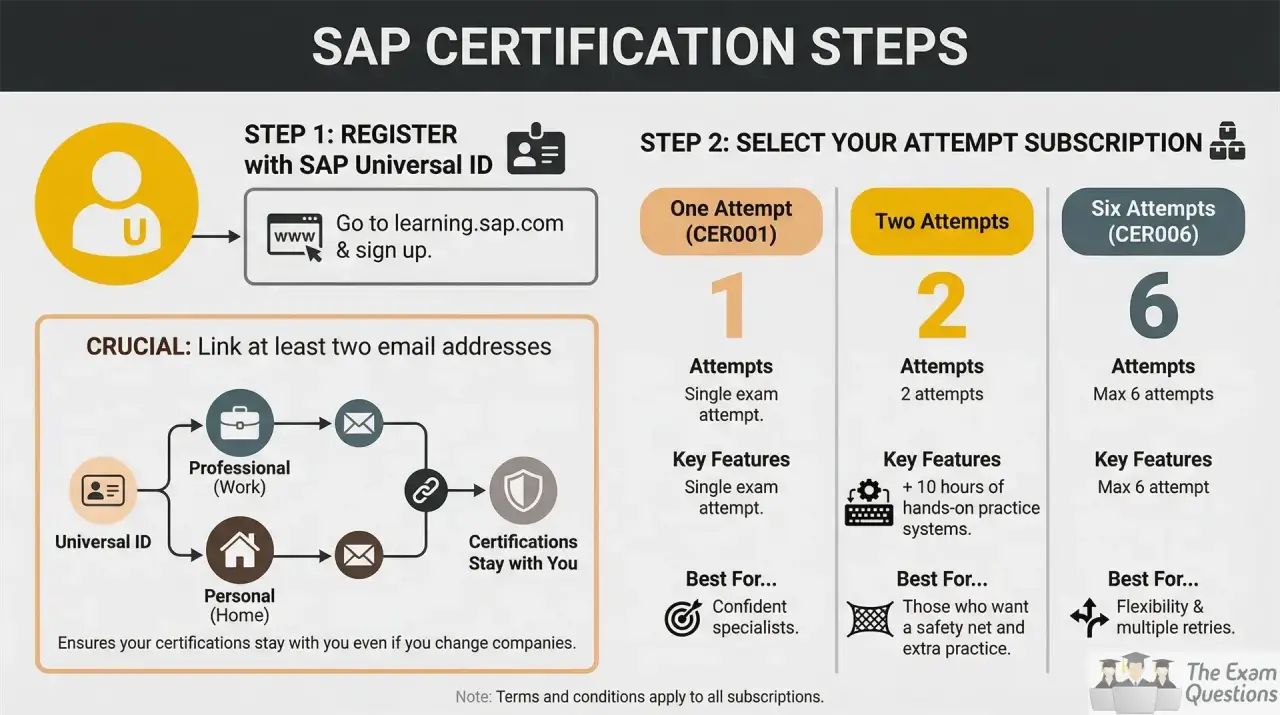
- Create your SAP Universal ID before you start your certification journey. SAP requires a certification-compliant Universal ID with at least two email accounts from different domains associated with it.
- Get exam attempts with a qualifying SAP Learning Hub subscription or buy exam attempts. The number of attempts you can have depends upon the subscription or purchase you have.
- Before appearing for the exam, visit the official page of the C_MDG_2601 certification and check the certification details. SAP recommends you to bookmark the certification page as it is an entry point to take the exam.
- To access the exam, click on “Go to Certification Exam” on the certification page. You can also access it by selecting Open in the related SAP Learning process.
- Before starting the assessment, review the exam information available on the certification exam page. The assessment type, number of remaining attempts and the exact time available is shown on SAP.
- When you are ready, select “Start the Certification Exam” to begin the assessment. The exam begins the examination countdown.
8-Week Study Plan for SAP Master Data Governance
Week 1:
Read the full Exploring the SAP Master Data Governance Deployments to learn about the MDG solution, deployment options, SAP S/4HANA, cloud deployment and federated MDG.
Week 2:
Understand the MDG solution approach, principles and core governance concepts with the official SAP Master Data Governance course.
Week 3:
Material Functions for MDG, Search and Processing, Data Model.
Week 4:
Business Partner for MDG, Customer, Supplier, Financials, and Hierarchy Management.
Week 5:
Complete the units on Multiple Object Processing, Mass Changes, Mass Processing and Consolidation.
Week 6:
Study Process Analytics, Cloud Ready Mode and Data Quality Management.
Week 7:
Learn the advanced features including Customizing and Setup, Data Quality Improvements, User Interface Modeling, Process and Data Modeling, Workflow, Data Replication, Key and Value Mapping, Custom Objects.
Week 8:
Understand the full official learning path and practice applying MDG concepts in business scenarios with special focus on governance processes, data domains and deployment options.
Want to try your SAP Master Data Governance skills? Download C_MDG_2601 PDF Questions and make your preparation effective with focused exam practice.
SAP Certified - SAP Master Data Governance Retake Rules
- Candidates can attempt the same certification exam up to four times in a 12-month period.
- There is a 24-hour waiting period between exam attempts.
- You can retake the assessment immediately with SAP if you have time left on the exam clock. This retake will count as one exam attempt.
- Candidates who have taken the exam four times unsuccessfully must wait 12 months from the date of their last attempt to take the certification exam again.
Questions regarding certification? Check the C_MDG_2601 FAQs for frequently asked questions on exam, preparation, retakes and certification validity.
Keeping C_MDG_2601 Certification Valid
- The C_MDG certificate is valid for 12 months. After this date, certified professionals must take the appropriate Stay Certified assessment to remain certified with SAP.
- An active SAP Learning Hub subscription is required for the Stay Certified assessment. The subscription gives you access to the assessment and associated preparation materials.
- You can take the Stay Certified assessment up to 90 days before your certification expires. You can do it at any time in this window, as long as you pass it before the expiry date.
- The Stay Certified assessment is a short, non-proctored assessment with unlimited attempts. SAP has course materials and/or live sessions available to assist you in preparing for it.
- Passing the assessment extends your certification for an additional 12 months. Your new expiry date is calculated from your original certification expiry date and not from the date you complete the assessment, as per SAP's current extension rules.
- You can see your certification status in SAP Learning. Your certification status and Stay Certified due date are available in My Learning → Certifications → Manage Certification.
- If you miss the Stay Certified deadline, your certification expires. SAP says you then have to re-certify by passing the current full certification exam.
- The Stay Certified assessment may not be used to maintain the certification if you do not have a SAP Learning Hub subscription. You have to retake the certification exam every year to remain certified, says SAP.
Conclusion
C_MDG_2601 is better treated as a qualification that examines the extent to which you can convert SAP Master Data Governance knowledge into believable answers to real-world business scenarios. What this means is that your prep should ultimately be about helping you explain your understanding clearly, and apply MDG concepts in context, not just recall definitions. The scenario-based assessment from SAP assesses responses based on criteria set by experts and considers how accurate, complete and effective the responses are.
Ready to practice for the practical assessment? Practice C_MDG_2601 Scenario Questions. Build your skills to respond to SAP Master Data Governance situations.
Prepare Yourself For The C_MDG_2601 Assessment With:
C_MDG_2601 Learning Resources | C_MDG_2601 Free Questions | C_MDG_2601 PDF Questions | C_MDG_2601 FAQs | C_MDG_2601 Scenario Questions