The SAP Certified Implementation Consultant Managed gateway for spend management and SAP Business Network certification validates practical integration knowledge. It covers integration between SAP procurement solutions, SAP Business Network and backend systems. The certification focuses on the skill set needed to support and administer these integration scenarios.
The Exam Questions helps you cover important certification-based syllabus by pointing out the areas that need more attention. You can use its exam resources to assess your knowledge before taking the certification exam.
Official C_ARCIG_2601 Exam Details
|
Exam Detail |
Official Information |
|
Exam name |
SAP Certified - Implementation Consultant - Managed gateway for spend management and SAP Business Network |
|
Exam code |
C_ARCIG_2601 |
|
Exam time |
120 minutes |
|
Exam type |
Scenario Based Assessment |
|
Cut Score |
60% |
|
Assessment activity |
1 activity |
|
Languages Available |
Available languages vary by format: Roleplay with AI guidance: English, Spanish, Italian, French, Japanese +25 more Video recording: English only |
|
Certification Validity |
12 months, extendable by another 12 months after passing the required assessment |
|
Official learning journey |
Administering SAP Integration Suite, managed gateway for spend management and SAP Business Network |
|
No. of courses |
17 courses |
|
Products and roles |
Architect, Business User, Consultant, Developer, SAP Business Network for Procurement, SAP digital supplier network membership |
For the latest exam information, always verify the current SAP Certified - Implementation Consultant - Managed gateway for spend management and SAP Business Network page before booking your attempt.
- Warning: Third party pages can show outdated duration, question counts, or formats.
What Is the C_ARCIG_2601 Exam?
The certification tests whether candidates can apply integration knowledge to practical implementation situations.
A simple way to understand the subject is Business requirement → Configuration → Integration → Transaction → Validation → Monitoring → Resolution. You can also use the C_ARCIG_2601 Study Guide as an additional resource.
The gateway supports configuration between SAP Ariba applications, SAP ERP or SAP S/4HANA, SAP Business Network and trading partners. SAP Learning specifically highlights configuration, cross references or value mappings, transaction validation, self testing and integration monitoring.
- Quick Win: Draw the seven step flow above and attach one real transaction example to every stage.
C_ARCIG_2601 New Exam Format
The current assessment uses a scenario based approach. The assessment is listed as 120 minutes and C_ARCIG_2601 as the current exam code.
There are two completion routes that are explained below:
- AI guided: A simulated interview asks real world questions, records your answers, and gives personalised feedback. Use “Save and view analysis” to check your performance and score before submitting.
- Human reviewer: Record and upload a video for evaluation against predefined criteria. Review may take up to 20 business days, and videos are kept for three months before deletion. Language availability may vary by format.
Practical certification assessments are open book and non proctored. Compared with the older format, the important change is the move away from simply recognising an answer and toward explaining how you would approach a practical situation.
- Quick Win: Practice answering aloud using Situation → Action → Reason → Result instead of memorising paragraphs.
- Warning: Do not assume an old multiple choice question count applies to the current assessment.
Key Topics to Study for C_ARCIG_2601
You can refer to the C_ARCIG_2601 FAQ page for clarification on courses and key topics. It can also help you understand the exam syllabus better.
1. Managed Gateway Architecture and Integration Concepts
Difficulty: 3/5
In the first topic, understand how Managed Gateway connects SAP procurement solutions, backend systems, SAP Business Network and trading partners. Then focus on knowing what each component does and where it fits in an end to end integration flow.
2. SAP Procurement and Backend Integration
Difficulty: 4/5
This topic is about the study of how procurement transactions move between SAP ERP or SAP S/4HANA and the connected network environment. Also pay attention to the direction of documents. It is because outbound and inbound flows can require different configuration and validation steps.
3. SAP Cloud Connector and Connectivity
Difficulty: 4/5
This topic is about learning why SAP Cloud Connector is used and also how it supports secure connectivity between on premise systems and SAP cloud services. Then review the relationship between connectivity configuration, backend access, and Managed Gateway communication.
4. Add On Configuration for SAP ERP and SAP S/4HANA
Difficulty: 4/5
In this topic review the purpose of the Managed Gateway add ons and how they support integration with SAP ERP and SAP S/4HANA systems. Also concentrate on configuration dependencies rather than trying to memorise every technical field.
5. General and Global Settings
Difficulty: 3/5
In this topic you will understand the settings that influence how integration projects and connected processes operate. These topics can look simple but scenario questions may test whether you understand their wider effect.
6. Mapping and Cross References
Difficulty: 5/5
Mapping is the identification of the conversion of information across systems and formats. Additionally cross references and value mappings are important when different systems use different values for the same business information.
7. Transaction Testing and Document Validation
Difficulty: 4/5
Learn how the available testing and validation tools help identify problems before or during transaction processing. Then understand what you are validating, what a failed result tells you and what should be checked next.
8. SAP Business Network Transaction Flows
Difficulty: 5/5
Study how business documents move through SAP Business Network and how suppliers or buyers interact with those transactions. The next study about the purchase orders, confirmations, advance ship notices, goods receipts, and invoices should be understood as connected business events rather than separate topics.
9. Monitoring and Troubleshooting
Difficulty: 5/5
Monitoring helps identify whether transactions were processed successfully and where failures occurred. Troubleshooting requires connecting an error message with the relevant transaction, configuration, mapping, connectivity or backend component.
10. Migration and End to End Integration Scenarios
Difficulty: 5/5
Study how existing integration configurations or processes are moved into the Managed Gateway environment and what needs to be checked during migration. End to end scenarios bring architecture, connectivity, configuration, mapping, transaction processing and monitoring together.
C_ARCIG_2601 Certification Learning Journey
The SAP Learning Journey Administering SAP Integration Suite, managed gateway for spend management and SAP Business Network includes 17 courses and an advanced level.
|
Code |
Course Name |
Units |
Time |
What it covers |
|
ARI010 |
SAP Integration Suite, managed gateway for spend management and SAP Business Network overview |
12 |
1 hr 50 min |
Covers the overall architecture, deployment options, support metrics, Cloud Connector, add-on components, connecting to the managed gateway, Project Creation Wizard, Mapping Tool, supported processes/master data, and migration steps. |
|
ARI140 |
Introduction to SAP Integration Suite, managed gateway for spend management and SAP Business Network |
6 |
2 hr 38 min |
Exploring SAP Integration Suite, managed gateway for spend management and SAP Business Network, Elaborating on Buyer Landscape and Buyer Integration, Analyzing Support, Discovering Integration, Exploring Add-On Components, Understanding SAP Cloud Connector |
|
ARI340 |
Configuring Global Settings for Managed Gateway for Spend&Network Add-On |
2 |
2 hr 3 min |
Explaining Integration Concepts, Configuring Global Settings |
|
ARI341 |
Deep-dive into SAP Integration Suite managed gateway for spend management and SAP Business Network |
4 |
3 hr 40 min |
Covers connecting to the managed gateway, data centers, ERP information, navigation, Document Validator, Connectivity Tool, Transaction Tracker, Resources, Audit Logs, and creating, testing, and deploying integration projects. |
|
ARI342 |
SAP Integration Suite, managed gateway – Managing customization using the Mapping Tool |
3 |
1 hr 10 min |
Introduces the Mapping Tool, its features and node functions, and creating custom mappings such as line-item extrinsics and date-format modifications. |
|
ARI343 |
3 |
1 hr 10 min |
Covers custom-based routing, inbound/outbound transactions, XPath and operands, routing configuration, and its limitations. |
|
|
ARI344 |
Introduction to Testing Tools in Managed Gateway for Spend&Network |
2 |
40 min |
Covers testing connectivity using the Connectivity Tool and testing document transformation using the Document Validator. |
|
ARI345 |
Configuring General Settings AddOn for Managed Gateway for Spend&Network |
4 |
2 hr 40 min |
Covers navigation of the Managed Gateway Add-On, middleware enablement, general settings for SAP Business Network, Strategic Sourcing and SAP Ariba Procurement, including interface setup, BAdIs, vendor entries, Supply Chain Collaboration parameters and timestamp settings. |
|
ARI400 |
5 |
1 hr 20 min |
Covers common master-data configuration, advanced system integration methods, system ID/date-time/user profile maintenance, field mapping, master-data export, BAdIs, resending data, parameters and filters. |
|
|
ARI401 |
4 |
3 hr 20 min |
Covers supplier, payment-term, user/group, tax and multi-ERP master data; procurement master-data parameters and filters; catalog master data; catalog upload jobs; BAdIs; dummy asset values and field mapping. |
|
|
ARI402 |
4 |
2 hr |
Covers SAP Ariba Strategic Sourcing master data, material master, external-system configuration, parameters, condition-type mapping, master-data/BOM imports, scheduling and advanced BAdI/field-map configuration. |
|
|
ARI404 |
Configure Supplier Lifecycle and Performance (SLP) Integration |
4 |
3 hr 30 min |
Covers SLP integration between SAP Ariba Sourcing and SAP, prerequisites/stipulations, initial and ongoing supplier synchronization, Managed Gateway configuration, MDG business functions, replication models, connections and message monitoring. |
|
ARI405 |
Configuring SAP Business Network Outbound IDOC Transaction Data Integration |
4 |
3 hr 37 min |
Covers IDocs and Purchase Order integration, including SAP-system configuration, message output control, parameters, PO/SA/SAR mapping, enhancements, customer exits, service PO configuration, Managed Gateway configuration and SAP Business Network trading relationships. |
|
ARI406 |
Configuring SAP Business Network Inbound IDOC Transaction Data Integration |
4 |
1 hr 48 min |
Covers IDoc fundamentals and supported transaction documents, invoice integration, invoice configuration in SAP Business Network, Managed Gateway and the SAP system, including company-code, tax-code, posting-key/document-type and event-linkage configuration. |
|
ARI407 |
3 |
2 hr 26 min |
Covers Web Service transaction data, Goods Receipt and Ship Notice integration, including configurations in the SAP system, Managed Gateway integration project and SAP Business Network. |
|
|
ARI408 |
Configuring SAP Ariba Strategic Sourcing Transaction Data Integration |
5 |
2 hr 7 min |
Covers Strategic Sourcing transaction flows, RFQ, Quote Message/Award, SAP-system configuration, Managed Gateway cross-reference parameters/UOM/lookup/Realm ID, SAP Business Network routing and Quote Message/Award integration. |
|
ARI409 |
Configuring SAP Ariba Procurement Transaction Data Integration |
8 |
2 hr 50 min |
Covers SAP Ariba Procurement Transaction Data, Purchase Order Integration in SAP Ariba, Purchase Order Integration in Managed Gateway, Purchase Order Integration in SAP, Goods Receipt Integration, Invoice Integration in SAP Ariba, Invoice Integration in Managed Gateway, Invoice Integration in SAP. |
- Quick Win: Study the journey as document flows first, configuration second.
- Pro Tip: Mark every course as Learn → Configure → Practise → Explain instead of simply ticking it as completed.
Who Should Take the C_ARCIG_2601 Exam?
C_ARCIG_2601 is suited to consultants and professionals involved in implementing or supporting integrations between SAP procurement solutions, SAP Business Network, and backend systems. SAP also identifies consultant, architect, developer, administrator, and related roles across its Managed Gateway learning content.
- Quick Win: Ask yourself Can I explain one complete integration without opening SAP Learning?
Career Benefits of C_ARCIG_2601 Certification
- C_ARCIG_2601 can formally document knowledge of SAP Managed Gateway integration.
- This certificate can strengthen a consultant profile involving SAP Business Network projects.
- C_ARCIG_2601 demonstrates knowledge of configuration, mapping, testing and monitoring concepts.
- This can assist in sparking discussions about SAP procurement integration responsibilities.
C_ARCIG_2601 PDF Questions are the best way to prepare for your exam. Practicing these questions can help you identify knowledge gaps and prepare more effectively.
- Quick Win: Put your certification on your CV beside the specific integration skills you actually know.
How to Register for C_ARCIG_2601
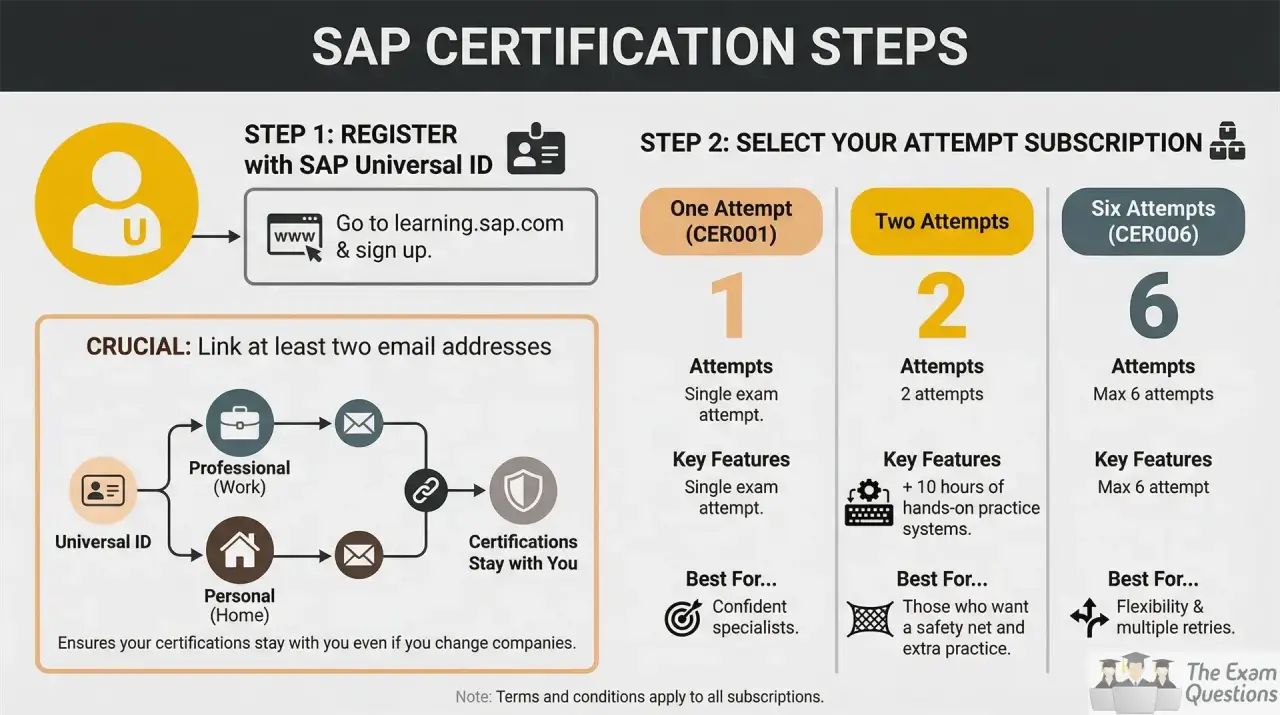
Begin on the SAP Certification site and open the current C_ARCIG_2601 certification entry. Confirm the current exam version, duration, language and booking requirements.
Sign in with your SAP account and follow the available certification booking route. If your organization provides SAP Learning Hub or certification access use the entitlement linked to that account.
Before you book make sure to check the technical requirements and assessment instructions provided by SAP. Keep your account information consistent so that your learning and certification records stay connected.
10 Week Study Plan For C_ARCIG_2601
|
Week |
Focus |
Practical task |
|
1 |
Exam structure and architecture |
Draw the end to end integration |
|
2 |
Backend and procurement integration |
Trace one document |
|
3 |
Cloud Connector and connectivity |
Create a connectivity checklist |
|
4 |
Add on and general settings |
Map configuration dependencies |
|
5 |
Mapping and cross references |
Follow one field across systems |
|
6 |
Testing and validation |
Review validator and testing concepts |
|
7 |
Business Network transactions |
Compare PO, confirmation, ASN, receipt and invoice |
|
8 |
Monitoring and troubleshooting |
Solve three fault scenarios |
|
9 |
Scenario practice |
C_ARCIG_2601 Free Questions will help you find weak areas |
|
10 |
Final revision |
Practice timed spoken answers |
- Note: Your final revision should answer one question: Can I explain what I would do and why?
C_ARCIG_2601 Retake Rules
- You may retake the same certification exam a maximum of four times within a 12 month period.
- There is a 24 hour waiting period between attempts on an exam.
- If you do not pass the assessment, but there is still time left on the exam clock, SAP will give you a second chance to take the assessment immediately; this counts as one exam attempt.
- If you do not pass after four attempts you must wait 12 months from the date of your last attempt before retaking the certification exam.
- Pro Tip: Use the 24 hour waiting period rule to avoid impulsive rebooking after an unsuccessful attempt.
Keeping C_ARCIG_2601 Certification Valid
- SAP states that the digital certification badge is valid for 12 months with eligible SAP Learning Hub users able to maintain certification through Stay Certified.
- If you have SAP Learning Hub check the Stay Certified option for C_ARCIG_2601 before expiry.
- If you do not have the relevant subscription check SAP's current renewal route because maintenance options can depend on certification and access model.may need to retake the applicable certification exam instead.
- For eligible certifications complete the relevant Stay Certified assessment during the 90 day period before expiry to extend certification for another 12 months.
- Quick Win: Put the certification expiry date into your calendar three months before it arrives.
Conclusion
C_ARCIG_2601 is built around SAP Managed Gateway for Spend Management and SAP Business Network integration knowledge. Strong preparation combines official SAP Learning
with practical scenario work. Current SAP material should always take priority over older CIG terminology.
Are you ready to take the assessment? The updated C_ARCIG_2601 Scenario Questions can strengthen your exam preparation. You can also use them for quick revision before the exam.
For More C_ARCIG_2601 Exam Revision Resources Check Below:
C_ARCIG_2601 Study Guide | C_ARCIG_2601 FAQ | C_ARCIG_2601 Free Questions | C_ARCIG_2601 PDF Questions | C_ARCIG_2601 Scenario Questions