Here we are listing all WalkMe Digital Adoption Consultant Frequently Asked Questions. These are mostly asked when appearing for WalkMe Digital Adoption Consultant Exam. Once you go through it, this will help you to better prepare for exam.
What is the cost of C_WME exam or WalkMe Digital Adoption Consultant certification fees?
200 USD if you purchase CER001 (1 attempt) and 500 USD if you purchase CER006 (6 attempts). For two attempts, 276 USD.
What is the passing percentage for WalkMe Digital Adoption Consultant exam?
65 Percentage
What is the duration of exam C_WME?
2 hrs
What are the topics covered in exam C_WME?
| Starting your Digital Adoption Journey: WalkMe Fundamentals |
| Getting Started with Building WalkMe Solutions |
| Advancing your Skills in Building WalkMe Solutions |
What books/courses needs to be read for exam C_WME?
- Starting your Digital Adoption Journey: WalkMe Fundamentals (WME001, 1 hr +)
- Getting Started with Building WalkMe Solutions (WME002, 10 hr +)
- Advancing your Skills in Building WalkMe Solutions (WME003, 8 hr +)
Where to get Study Material and books for C_WME?
You can check here the learning journey provided by SAP here Starting your Digital Adoption Journey with WalkMe
In how many languages C_WME exam available?
English
What is the level of WalkMe Digital Adoption Consultant exam?
Associate
What is the process to register C_WME exam?
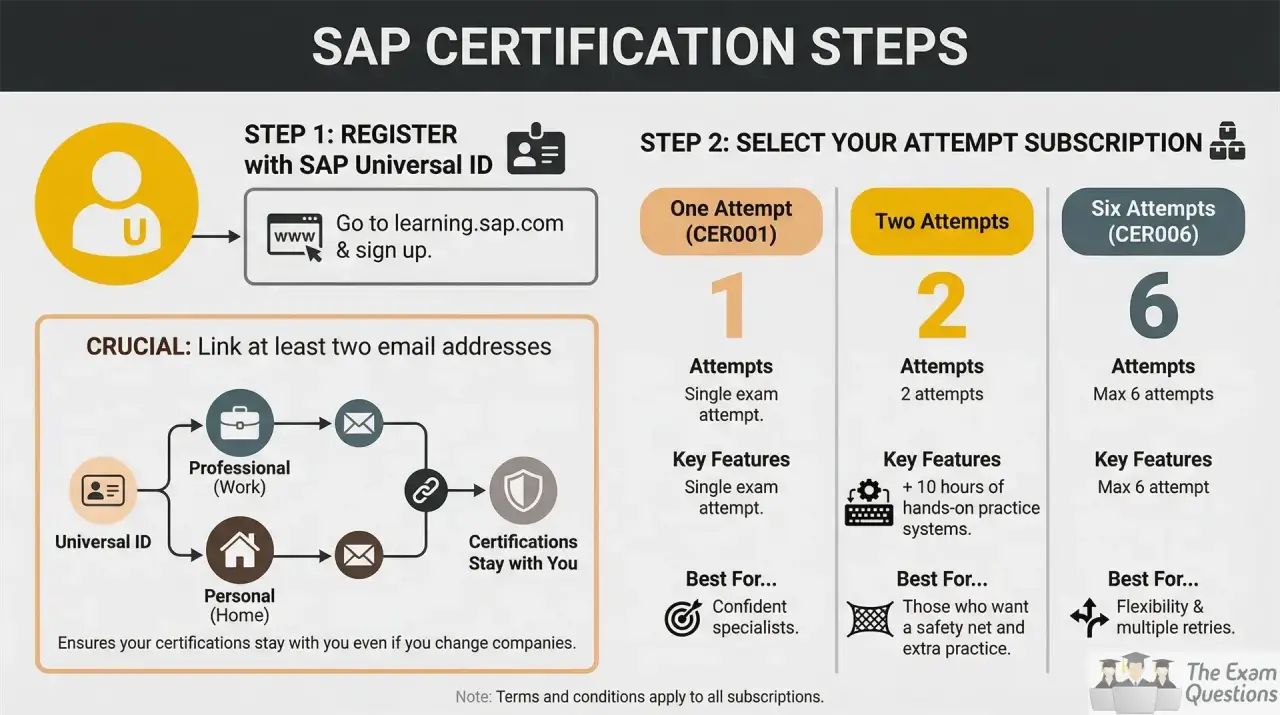
1. Register with an SAP Universal ID
Instead of a simple email registration, SAP now requires an SAP Universal ID.
- Go to learning.sap.com and sign up.
- Crucial: Link at least two email addresses (professional and personal) to your Universal ID. This ensures your certifications stay with you even if you change companies.
2. Select Your Attempt Subscription
SAP now offers three main standalone tiers for exam attempts. Choose the one that fits your needs:
| Subscription Type | Attempts | Key Features |
| One Attempt (CER001) | 1 | Single exam attempt. |
| Two Attempts | 2 | 2 attempts + 10 hours of hands-on practice systems. |
| Six Attempts (CER006) | 6 | Max 6 attempts (max 3 per specific exam). |
- Pro Tip: If you need study materials as well, consider the SAP Learning Hub subscription, which includes 4 exam attempts per year plus full access to all training content and "Stay Certified" assessments.
3. Purchase and Access
- Search for your chosen attempt tier on the SAP Training Shop or directly through the pricing links on SAP Learning.
- Complete the checkout. Once processed, your subscription will be tied to your Universal ID.
- To see your active attempts, go to SAP Learning > My Learning > Subscriptions.
4. Schedule via the Exam Dashboard
- Navigate to the specific page of the certification you want to take (e.g., C_WME).
- Click the "Schedule" or "Go to Certification Exam" button. This will redirect you to the Certification Hub.
- Click on "Exam Dashboard".
- Find your exam in the list and click the Calendar Icon to pick a date and time.
- Important: Set your Time Zone manually. If left blank, it defaults to UTC, which often causes candidates to miss their window.
5. Prepare for the New Exam Formats
The format has moved beyond simple multiple-choice. Depending on the exam, you may encounter:
- Scenario-Based Assessments: Answering real-world problems in a simulated environment.
- AI-Guided Roleplay: For certain certifications, you may interact with an AI (Yoodli) to justify your technical decisions.
- Open-Book: Some practical exams now allow access to official SAP documentation during the test.
6. Maintain Your Badge ("Stay Certified")
SAP certifications now require an annual "maintenance" to remain valid.
- Your badge is valid for 12 months.
- To extend it, you must complete a "Stay Certified" assessment (a short, non-proctored quiz) on the SAP Learning portal before the expiration date.
Note: These assessments typically require an active SAP Learning Hub subscription to access.
How is the exam conducted?
SAP C_WME Certification exam is remotely proctored via a webcam on your PC or laptop, and you can schedule your exam 24/7 via Certification Hub.
Do I need to go someplace to take the C_WME exam?
No, exams are available online 24/7 and each exam is proctored remotely. You can take exams anywhere in the world as long as you have an Internet connection and a laptop or desktop computer with a webcam.
Do I need to be alone to take exam?
Yes, phone should also be switched off. Your exam supervisor or examiner will ask you to rotate your webcam around the room prior to beginning your SAP Certification exam. Please ensure the area contains only permitted items approved by your exam supervisor. Whiteboards and bulletin boards must be cleared, erased, or covered, unless they are facing away from you. All cell phones, tablets, and other communication or recording devices must be removed from the computer area.
Can I take SAP C_WME Certification exam on a tablet computer?
No, tablets are not supported.
What do I receive after successful completion of exam?
Successful examinees receive an SAP Certification digital badge for their accomplishment.
What is the benefit of taking the exam?
- Gain a highly recognized accreditation of excellence.
- Differentiate yourself in the labour market.
- Validate your skills to execute with confidence.
- Possibility to attain higher wages and billable rates with a highly valued credential.
Can I retake for WalkMe Digital Adoption Consultant exam, if fail?
You can attempt C_WME exam 2 more times. If in worst case, you still could not clear the exam after 2 times, then you will have to wait for next version of exam to arrive.
What topics are covered in Course Starting your Digital Adoption Journey: WalkMe Fundamentals?
- Navigating First Steps of Your WalkMe Journey
- Introducing WalkMe Fundamentals
- Implementing WalkMe's Data.Action.Experience Methodology
- Exploring WalkMe Applications
What topics are covered in Course Getting Started with Building WalkMe Solutions?
- Introducing WalkMe Environment and Apps
- Strategizing with WalkMe
- Creating Logic with Condition Builder
- Using SmartTips
- Using Smart Walk-Thrus
- Managing Smart Walk-Thru Flow Steps
- Configuring Resources
- Exploring Shuttles
- Managing Onboarding Tasks
- Implementing Entry Points & Menu
- Creating Launchers
- Designing ShoutOuts
- Implementing Segmentation
- Previewing & Publishing Content
- Troubleshooting Content Issues
What topics are covered in Course Advancing your Skills in Building WalkMe Solutions?
- Reviewing Technical Configuration
- Expanding on Segmentation
- Configuring Design Settings
- Implementing Text & Multi-Language
- Getting Started with jQuery
- Enhancing Smart Walk-Thrus
- Elevating SmartTips
- Refining Launchers
- Customizing ShoutOuts
- Creating Effective Surveys
- Ensuring Quality Assurance
- Getting started with WalkMe Analytics
How can I get the practice questions for exam C_WME_2606?
Practice questions are very important to understand the pattern of exam. You can check C_WME practice questions here.
Tags:
C_WME FAQ | C_WME detail | C_WME study material | C_WME practice tests | C_WME Pdf questions | C_WME Free questions